In today’s fast-moving development world, pushing code directly to production is one of the biggest mistakes a team can make.
It might work in the beginning… but as your application grows, it leads to bugs, downtime, and security risks.
That’s where a secure multi-environment CI/CD pipeline becomes essential.
In this blog, I’ll walk you through:
- What a multi-environment pipeline is
- Why it matters
- How to build it step-by-step
- Common mistakes to avoid
All explained in simple, practical language.
What is a Multi-Environment CI/CD Pipeline?
A CI/CD pipeline is an automated process that builds, tests, and deploys your code.
A multi-environment pipeline means your code doesn’t go directly to production. Instead, it passes through multiple stages:
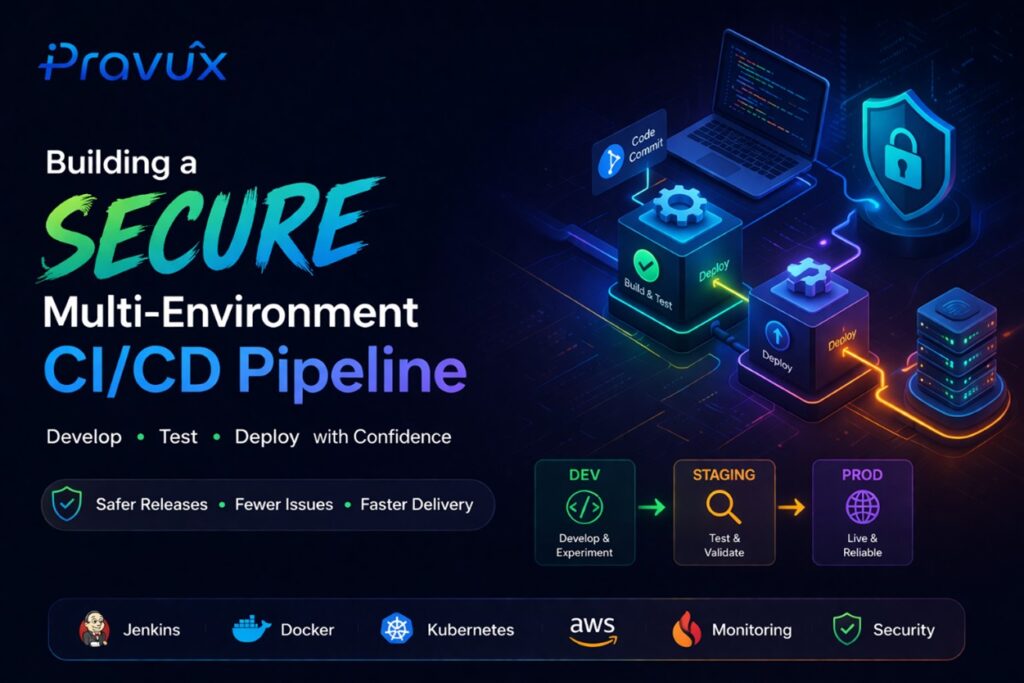
Developer → Dev → Staging → Production
Each environment has a specific role:
Dev Environment
- Used by developers
- Fast testing of new features
- Not always stable
Staging Environment
- Same as production (or very close)
- Used for QA testing and validation
- Final checkpoint before release
Production Environment
- Live application
- Used by real users
- Must be stable, secure, and reliable
Why This Setup is Important
Without proper environments, teams often face:
- Bugs reaching production
- No proper testing process
- Risky deployments
- Difficulty in fixing issues
- Security vulnerabilities
A structured pipeline helps you:
- Reduce errors
- Improve deployment confidence
- Maintain system stability
How a Basic CI/CD Pipeline Works
Here’s a simple flow:
- Developer pushes code to Git
- CI/CD pipeline is triggered
- Code is built and tested
- Deploy to Dev environment
- Run automated tests
- Deploy to Staging (after approval)
- Perform final testing
- Deploy to Production
This ensures that your code is tested at every stage before reaching users.
Security: The Most Important Layer
Many teams build pipelines but ignore security — which is risky.
Let’s look at key security practices.
- Never Store Secrets in Code
Avoid putting sensitive data like:
- API keys
- Database passwords
- Private keys
inside your codebase.
Best Practice:
Use:
- Environment variables
- Secret managers
Example:
DB_PASSWORD = stored securely (not in GitHub)
- Role-Based Access Control (RBAC)
Not everyone should have access to production.
Define clear roles:
- Developers → Dev environment
- QA → Staging
- Admins → Production
This prevents accidental or unauthorized deployments.
- Separate Infrastructure for Each Environment
A common mistake is using a single server for everything.
Don’t do this:
- One server for Dev, Staging, and Production
Do this instead:
- Separate servers or instances for each environment
Benefits:
- Better isolation
- Improved security
- More reliable testing
- Add Automated Testing
Before moving code forward, run tests like:
- Unit tests
- API tests
- Basic UI checks
If tests fail, the pipeline should stop automatically.
This saves you from pushing broken code.
- Add Approval Before Production
Production deployments should not be fully open.
Add:
- Manual approval step
- Restricted deployment from main branch only
This adds a safety layer before going live.
- Monitoring & Alerts
Deployment is not the end — it’s just the beginning.
Track:
- Server performance
- Errors
- Response time
Set alerts so you can act before users notice issues.
- Always Have a Rollback Plan
Even with the best setup, things can go wrong.
Be prepared to roll back quickly.
Example:
Version v1.2 has a bug → Rollback to v1.1 instantly
Using versioned deployments or containers makes this easy.
Tools You Can Use
Start simple. You don’t need everything at once.
- CI/CD: Jenkins, GitHub Actions, GitLab CI
- Containers: Docker
- Cloud: AWS, DigitalOcean
- Monitoring: Prometheus, Grafana
- Web Server: Nginx
Common Mistakes to Avoid
- Deploying directly to production
- Skipping staging environment
- Hardcoding secrets
- No monitoring system
- No rollback strategy
- Overcomplicating too early
Final Thoughts
A secure multi-environment CI/CD pipeline is not just about automation…
It’s about building a system where:
- Deployments are safe
- Issues are minimized
- Teams can move faster with confidence
When done right, it helps your team:
- Release faster
- Reduce downtime
- Avoid production stress
And honestly… sleep better at night
What’s Next?
In upcoming blogs, you can explore:
- Complete CI/CD setup with Jenkins
- Docker-based deployment architecture
- Monitoring with Prometheus & Grafana
- Auto-scaling infrastructure
If you found this helpful, consider sharing it with your team or saving it for later