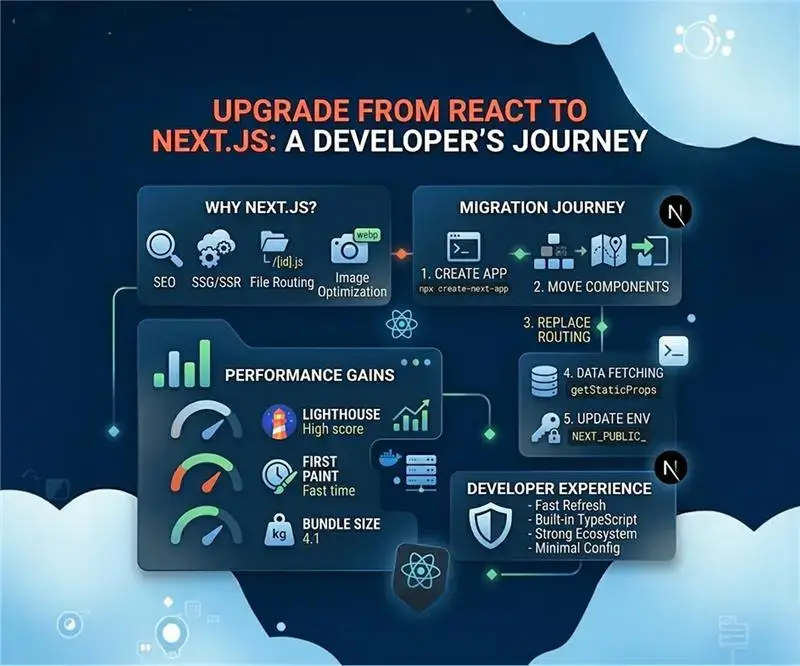

If you’ve been building applications with React for a while, you’ve probably encountered some recurring challenges, such as setting up routing, optimizing for search engines, managing server-side rendering, or configuring build tools. These are common pain points that can slow down development and complicate your codebase.
At Pravux Technologies Pvt. Ltd., we’ve seen these challenges in real-world projects, especially as applications grow and require better performance and scalability.
Next.js addresses these issues by building on top of React with powerful features that come pre-configured. In this blog, I’ll walk you through why upgrading makes sense, what benefits you gain, and how to approach the migration.
Understanding the Difference
Before diving into the upgrade process, it’s important to understand that Next.js isn’t a replacement for React; it’s an enhancement.
- React → A library for building UI
- Next.js → A full-stack framework built on React

Think of it this way: React gives you building blocks, while Next.js provides structure and ready-to-use solutions. This is the same approach we follow at Pravux Technologies Pvt. Ltd. when designing scalable applications.
Why Consider Next.js?
Built-in Routing System
One of the biggest improvements is file-based routing. Instead of configuring routes manually, you simply create files and Next.js handles everything.
For example, pages/about.js automatically becomes /about. Dynamic routing is also simple using [id].js.
Benefits include:
- No manual routing setup
- Cleaner project structure
- Faster development
Multiple Rendering Strategies
React apps usually rely on client-side rendering, which can impact SEO and performance. Next.js offers flexibility with multiple rendering approaches.
You can choose:
- Static Site Generation (SSG) for static content
- Server-Side Rendering (SSR) for dynamic content
- Incremental Static Regeneration (ISR) for hybrid use cases
- Client-side rendering when needed
At Pravux Technologies Pvt. Ltd., we often combine these strategies to get the best results.
Automatic Code Splitting
Next.js automatically splits code by page. This ensures users only load what they need.
Result:
- Faster load time
- Better performance
- Smaller bundles
Image Optimization
The built-in Image component optimizes images automatically by resizing and serving modern formats.
Key advantages:
- Better loading speed
- Improved Core Web Vitals
- No extra configuration
This has been especially useful in performance-focused projects at Pravux Technologies Pvt. Ltd.
API Routes (Full-Stack Capability)
Next.js allows you to create backend APIs within the same project.
- pages/api/users.js → /api/users

This enables:
- Full-stack development
- Faster implementation
- Reduced dependency on separate backend services
When to Upgrade
Not every React app needs Next.js, but in many cases, upgrading is beneficial.
Consider upgrading if:
- SEO is important
- You want faster initial page loads
- You need SSR or SSG
- You want less configuration
- You need backend + frontend together
You can stay with React if:
- It’s an internal dashboard
- SEO is not required
- It’s a highly dynamic SPA
At Pravux Technologies Pvt. Ltd., we always base this decision on project requirements rather than trends.
The Migration Approach

Migrating from React to Next.js doesn’t have to be complex. A gradual approach works best.
1. Start with a New Project
Create a new Next.js app alongside your existing project:
npx create-next-app@latest my-nextjs-app
This allows safe and incremental migration.
2. Move Components Gradually
Most React components will work directly in Next.js. However, keep in mind:
- Handle browser APIs (window, document) carefully
- Adjust CSS structure if needed
3. Replace Routing
Move from React Router to file-based routing:
- pages/index.js → homepage
- pages/about.js → /about
- pages/blog/[slug].js → dynamic routes
This simplifies your routing logic significantly.
4. Optimize Data Fetching
Instead of using useEffect, Next.js provides:
- getStaticProps → build-time data
- getServerSideProps → request-time data
- getStaticPaths → dynamic routing
Benefits:
- Better performance
- Improved security
- Reduced client-side API calls
At Pravux Technologies Pvt. Ltd., this change has significantly improved efficiency.
5. Update Environment Variables
Next.js separates environment variables:
- NEXT_PUBLIC_ → client-side
- Others → server-side
This adds an extra layer of security.
6. Handle Images & Assets
- Move assets to /public
- Replace <img> with <Image>
This ensures optimized loading and better performance.
Common Challenges and Solutions
While migration is smooth, some challenges may occur.
Common issues include:
- Third-party libraries not supporting SSR
- Handling authentication logic
- Adjusting state management
Solutions:
- Use dynamic imports for SSR issues
- Plan authentication strategy carefully
- Reduce unnecessary client-side state
At Pravux Technologies Pvt. Ltd., we handle these during migration planning to avoid production issues.
Performance Gains You’ll Notice
After migrating to Next.js, improvements are noticeable:
- Lighthouse score improves significantly
- Faster Time to First Byte (TTFB)
- Faster First Contentful Paint (FCP)
- Reduced bundle size
These improvements directly impact user experience and engagement.
We’ve consistently seen these results across projects at Pravux Technologies Pvt. Ltd.
The Developer Experience
Next.js also improves the developer experience with:
- Fast Refresh
- Built-in TypeScript support
- Minimal configuration
- Strong ecosystem
This reduces setup time and improves productivity.
Making the Decision
Upgrading to Next.js depends on your goals. If you need better SEO, performance, and scalability, it’s a strong choice.
The migration can be gradual, allowing teams to adapt step by step.
At Pravux Technologies Pvt. Ltd., we treat Next.js as a natural evolution of React development.
Final Thoughts
The web development landscape is evolving, and Next.js represents a mature approach to building modern applications. It reduces repetitive setup and integrates best practices directly into the framework.
Whether you upgrade or not, understanding Next.js will make you a better developer.